Articles
Ruli vs. Claude: Which Legal AI Platform Is Right for Your In-House Team?
Web Format

Not all legal AI is built for the same job. Some tools help individual lawyers answer questions faster. A few are built to transform how an entire in-house legal team operates, from the daily contract queue to the regulatory change no one saw coming to the question the CFO asks an hour before a board meeting.
Ruli is built for the second job: one platform that runs research, redlining, regulatory monitoring, and due diligence — all grounded in your playbooks and institutional knowledge. This guide is honest about where Claude is strong, where in-house teams tend to outgrow it, and why legal teams choose Ruli for the full scope of your work, not just one slice of it.
How to evaluate a legal AI platform for your in-house team
Before diving into the comparison, here are five questions worth asking before you buy any legal AI:
Does it cover the full job, not just one slice? In-house legal teams live in contracts, research, regulatory change, and business operations — not one workflow. A tool that only does one forces you back to manual work or other vendors.
Was it built for in-house teams, or adopted from a Big Law tool? Firms manage many clients, so their tools optimize for managing many clients’ matters. In-house teams typically manage one company’s risk, continuously — which means you need a system that knows your company deeply: your playbooks, your risk posture, and your precedent. Tools adopted from law firms carry assumptions and workflows that don’t fit the in-house role.
Does the output match your team’s voice and standards? Generic drafts create work. Effective legal AI’s output should carry your redlining style and your positions, ready to send — not an output you have to verify and rewrite before it can leave the building.
Can you measure what it saves you? If a vendor can’t help you quantify impact — hours saved, outside counsel spend avoided, response time improved — it’s hard to justify to your CFO. Look for a vendor whose pilot produces the numbers from day one.
Does the team behind the AI understand legal risk? A confident wrong answer is worse than none. A platform built by lawyers and engineers who know the cost of a bad redline or a missed regulatory change is not the same as a general chatbot with a legal skin.
Who Claude is designed for
Claude is a frontier model, not a legal product. In May 2026, Anthropic released Claude for Legal: 12 open-source practice-area plugins (Commercial, Corporate, Litigation, Employment, Privacy, and more). Each plugin is a skill or prompt-instructions set giving you a starting point for that task.
Separately, Claude for Word lets users ask questions or instruct docx edits with tracked changes, but Anthropic’s own guidance restricts it to trusted, internal documents, not counterparty files.
In short: Claude gives a lawyer a powerful, configurable starting point. Whether it holds up as a system for a full in-house team is the question this comparison answers.
Where Claude creates value
Writing quality strong enough for client memos, executive summaries, and translations of dense regulatory text into business-readable copy.
Reasoning that holds across documents, so a lawyer can load a contract and a playbook into the same window and get deviations flagged clause by clause.
Workflows that save real time on first-pass review when the output is checked properly.
Where organizations tend to hit limits with Claude
Citations aren’t verified against primary legal sources by default: Anthropic’s own plugin repository marks citations as needing verification until a research connector like Westlaw or CoCounsel is attached — so out of the box, legal research output isn’t grounded.
Drafting reads like a generalist, not a lawyer: Claude edits and rewrites broadly rather than making the surgical, position-specific changes a redline calls for, and it doesn’t weigh tradeoffs across multiple open issues in a document the way a lawyer negotiating a deal does.
Playbook consistency isn’t enforced across a team: A playbook lives as a file that’s edited and re-run through setup — nothing guarantees every reviewer is working from the same current version, or tracks who last updated it, the way a centrally maintained playbook does.
Limitations beyond dozens of documents: Claude has shown batch processing across dozens of documents, but nothing confirms it holds up across hundreds or thousands of documents with the reliable, sentence-level citations a real due diligence review requires.
No persistent, searchable contract repository: Once a session ends, nothing indexes or stores the documents Claude touched — there’s no structured database to search across deals or pull precedent later.
“Only use Claude for Word with trusted documents and not documents from external untrusted sources (for example, downloaded templates, counterparty files, or collaborative documents shared via email).” — Claude Help Center
Because of prompt injection risk, this rules out the add-in for the majority of contract review work at most in-house teams.
How Ruli approaches the same problem
Research answers are grounded from the first citation: Ruli’s legal research runs on the team’s own playbooks and prior positions, so every citation traces back to a primary source without a separate connector or setup step required.
Redlines read like the lawyer negotiating the deal, not a generalist: Ruli applies the team’s playbook position by position and weighs tradeoffs across every open issue in a document, rather than rewriting broadly the way a general-purpose model does.
Playbooks stay centrally maintained across the whole team: a playbook in Ruli lives as a shared, current source that every reviewer works from, with a record of who updated it and when, so consistency doesn’t depend on which local file someone happened to load.
Volume is the reason the tabular review product exists: it runs across thousands of contracts at once for M&A and due diligence, with the same sentence-level citations intact at that scale.
Every document reviewed becomes part of a searchable repository: Ruli indexes contracts as they’re reviewed, so the team can search across deals and pull precedent on a later matter instead of starting from zero.
Reviewing counterparty paper is the core job, not a use case to work around: third-party contracts, templates, and documents from the other side’s counsel are most of what an in-house review workflow actually is, so that’s what Ruli is built to run on.
Side-by-side comparison
Capability | Ruli | Claude |
|---|---|---|
AI legal assistant (chat interface) | Yes (Assistant) | Yes (can use Claude Legal Practice-Area Plugins) |
Word plugin for in-context redlining | Yes (Word Extension) | Yes (Claude for Word — beta) |
Company Profile — personalization of risk tolerance and responses | Yes | No |
Playbook creation and review | Yes | Partial — requires Setup Interview and command prompting |
Regulatory monitoring with curated sources | Yes (Monitor) | Partial — cookbooks via API, not a packaged product (no source fine-tuning) |
Indexed US, UK, and EU legal sources | Yes — Ruli Legal Database | No |
Smart contract repository and search | Yes (Contract Lens) | No |
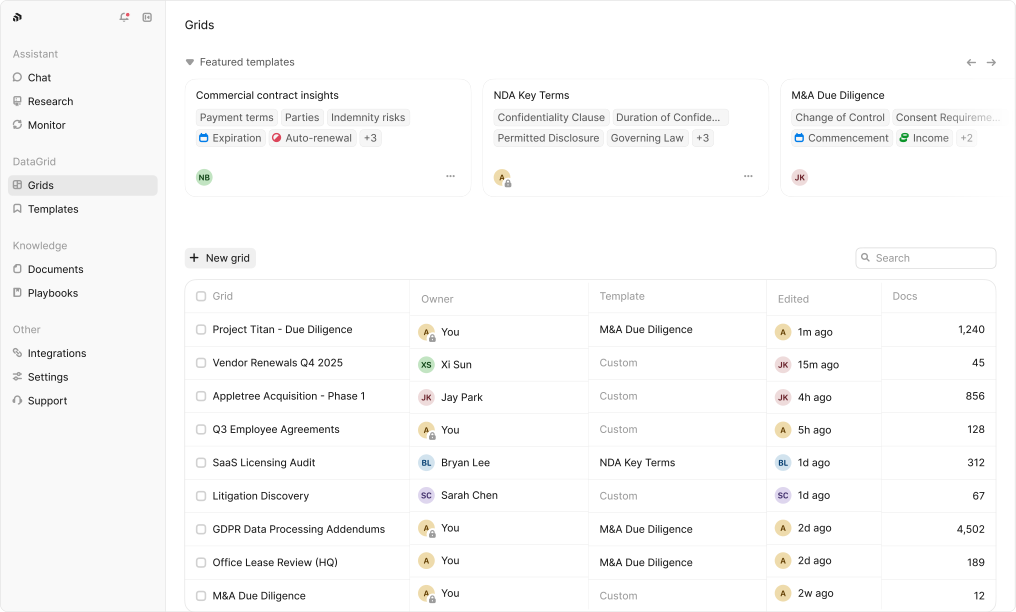
Tabular document review at scale (M&A / due diligence) | Yes (DataGrid) — supports up to 10K documents per analysis | No — limited to a dozen documents without reliable sentence-level extraction |
Structured two-week onboarding | Yes | No |
Team-level usage analytics for legal tasks | Yes | No |
ROI measurement built into pilot process | Yes | No |
When is Ruli a better fit than Claude?
The Assistant should already know your company’s risk tolerances, not get reconfigured every time. Claude’s context is scattered — a playbook file per plugin, a separate Projects workspace per matter — with no single place that holds who the company is or how it thinks about risk. Ruli’s Assistant works from one company profile across the whole platform, so Research, Contract Lens, and Monitor all draw on the same understanding of the business.
More than one reviewer touches the same playbook. Claude’s practice profile is a one-time setup one person configures per plugin; there’s no shared system enforcing that same profile across every lawyer on a team. Ruli’s Knowledge Base holds playbooks, prior deals, and policies centrally, so every reviewer works from the same baseline.
Counterparty documents are the majority of the work. Anthropic’s own guidance says to only use Claude for Word with trusted, internal documents, not counterparty files. For most in-house teams, counterparty paper is the bulk of contract review. Ruli’s Word Extension is built to handle counterparty drafts directly.
Contracts need to be searchable after the fact, not just processed once. Once a Claude session ends, the documents it touched aren’t indexed or stored anywhere. Ruli’s Contract Lens keeps a team’s contracts in one repository that stays searchable.
Diligence and contract review need to happen at hundreds or thousands of documents, not dozens. Claude can batch-process a folder in a single run but cannot hold up at scale with reliable, sentence-level citations. Ruli’s DataGrid is built for precision at volume.
Legal research needs to be grounded, not just plausible. Claude’s citations aren’t verified against primary sources by default. Ruli’s Assistant and Research capability treats US, UK, and EU statute and regulation as primary sources from the start.
Regulatory monitoring needs to run continuously, not get re-prompted. Claude’s monitoring exists as Managed Agent cookbooks requiring the API and self-setup. Ruli’s Monitor is a purpose-built dashboard with trusted sources out of the box and ongoing policy impact tracking.
The work is regulated. Cowork activity, and by extension Claude Legal, still isn’t captured in Anthropic’s Compliance API. Ruli is SOC 2 Type II certified with the audit trail regulated industries require.
Leadership needs visibility into risk and impact across the team’s work. Claude has no packaged dashboard for workload, status, or activity. Ruli gives legal ops two dashboards — Usage Metrics and a Risk Monitor Dashboard — helping General Counsels manage risk and show impact to the business.
When Claude may be the right fit
Claude is worth looking into when you’re a solo practitioner or very small team with no shared playbook to enforce and no cross-reviewer consistency to maintain, since a one-time practice profile setup is workable rather than a workaround. It’s also worth a look when the documents in scope are internal rather than counterparty paper, since Anthropic’s own guidance limits Claude for Word to trusted, internal documents. A team already on a paid Claude plan gets extra value at no additional cost, since the Claude Legal plugins are free. And for long-context, first-pass review, Claude genuinely delivers: a one-million-token window handles a full deal in one pass, with writing quality strong enough that summaries typically need light editing rather than a rewrite.
The honest line: for a lawyer working alone on internal documents, Claude holds up well. The moment a second reviewer needs the same playbook, counterparty paper enters the picture, or the work needs to satisfy an audit trail, the architecture starts working against the team rather than for it.
The bottom line
Claude is solving a real problem too: a foundation model strong enough that lawyers are reaching for it before anyone builds them a dedicated tool. But what Claude offers across drafting, research, contract review, and regulatory monitoring is raw capability, not a refined legal tool built for any one of those jobs.
It drafts, but without the surgical, position-aware editing a redline calls for. It researches, but without primary sources grounded in by default. It can process a folder of contracts in one pass, but nothing persists afterward, so there’s no contract database to search or build on later. And it can track regulatory change if a team builds the workflow, but there’s no packaged monitoring tool doing that automatically with trusted sources. Each of these is a blunt version of a job a dedicated tool does with precision.
Claude for Legal is infrastructure a team assembles — each plugin requires its own cold-start interview and maintenance. For a solo practitioner, it’s a great starting point. For a growing team, the gaps are immediate.
Ruli is a platform, not a prompt you configure. One company profile holds your risk tolerances, your playbooks, and your precedent, and the Assistant, the redline, the research, and the regulatory monitoring all draw from that same profile. Nothing needs to be reconfigured per plugin, rebuilt per matter, or held together by whoever set it up in the first place. Ruli adapts and behaves like an extension of your team, with a memory advantage that understands your team’s contracts, decisions, and negotiation history instead of starting cold.
See how Ruli works across your team’s actual workflows, starting with the work already on your desk.
Related resources

Guidebooks
Ask Your Contracts Anything
“How many times have we agreed to this?” usually gets answered by whoever happens to remember the deal. This guide shows how in-house legal teams turn every signed contract, amendment, and schedule into a sourced answer, so the next negotiation starts from the company’s own track record.
1 min read
Ebook
Download

Guidebooks
Build or Buy: Which One Is Right for You?
Both paths work. What separates them is what each one asks of your team in staffing, governance, and budget before the lawyer hours come back.
1 min read
Download

Guidebooks
The Business Case for Legal AI
The four ways in-house teams measure the value of legal AI, backed by real numbers from real customers.
1 min read
Download